| LatchKey.ai | Archive | About | Consulting | Forward |

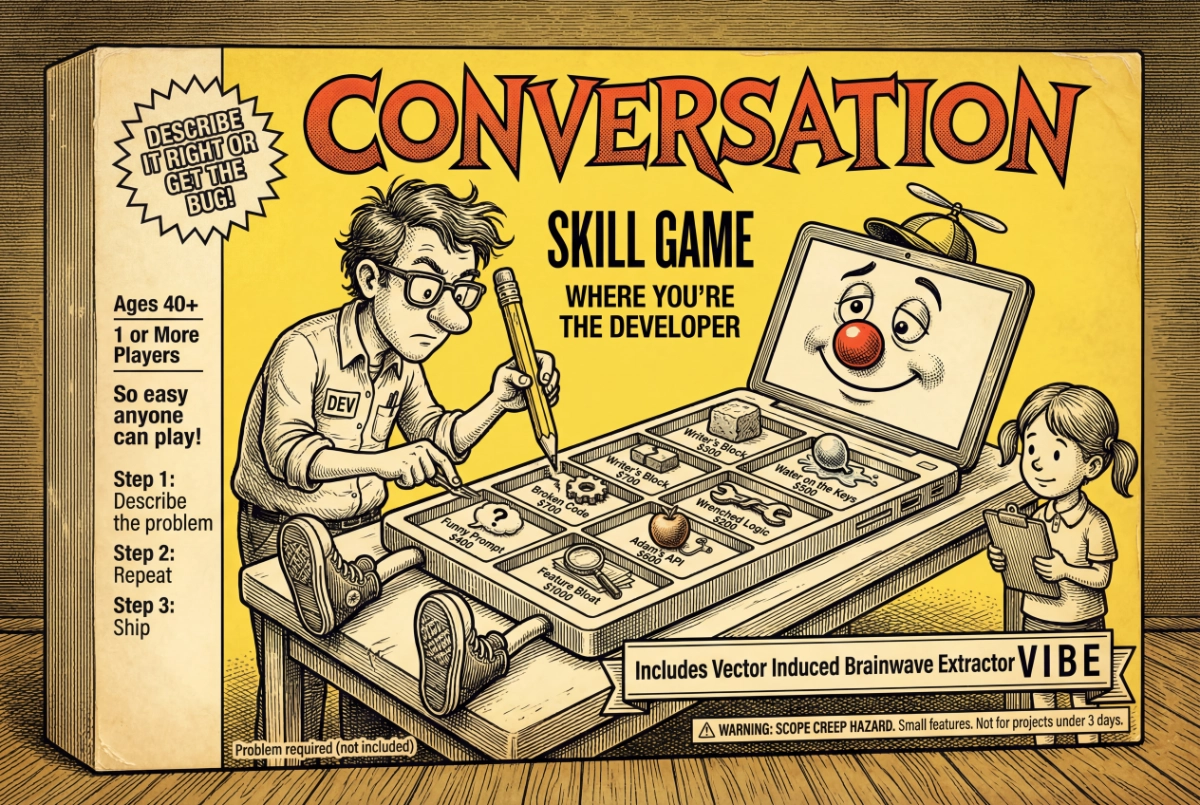
Issue #9: Some Assembly Required
The first in a semi-regular series of more technical walkthroughs
click to view full-size
You've no doubt had some wins by now with AI. Drafted something faster. Extracted key data from some dense PDFs. Cleared a bottleneck that would have eaten your afternoon. You did it and it made sense, right?
You felt in control because you understood the assignment. And it wasn’t prompting tricks or rigid structures. It was just clear communication of intent.
And once that clicks, something shifts. Like a little radar popping up in your peripheral vision, you start measuring every task that crosses your desk as a candidate for AI enrichment. That's real. That's progress.
But what about the problems beyond text or file organization? The daily frictions that don't need a prompt — they need software. The "if only there were an app for that" moments we all have.
Here's the question: Do you believe you could actually build your own app to solve your own problem?
At this point, it really shouldn't seem alien. Because the same skills you're already flexing by thinking clearly about what you want, describing it, and iterating through conversation, are the exact same skills you need to build software in 2026.
You don't need to code. That IS the revolution. You just need to understand the problem and have the judgment to recognize when you've solved it.
Let me show you some things I built over the last few months to solve real pain-points I hit while building this newsletter and my consulting business. Each one forced me to answer the same questions differently: What is the problem? What would solve it? And what does "done" look like?
Those questions are the ballgame, folks.
Build 1: Vid2Notion
FastAPI/Python/PWA
I watch a LOT of YouTube. Not doom-scrolling or slop — research. Tutorials on tools I'm evaluating, talks from people whose thinking I want to absorb, deep dives on topics that might become newsletter material or shape a client conversation. And of course, synthesizers.
The problem is that video is a black hole for retrievable knowledge. Watch something great on a Tuesday, two weeks later you’re working and remember that video as relevant. Oh…what did it say?
app icon
We remember it exists. Might even remember the channel. But by the time you scroll through a long watch history and scrub through 45-minutes of video hoping to recognize the sentence when we hear it, you’ve basically diverted into a whole other project.
The knowledge was useful, but fleeting.
YouTube provides transcripts, but it’s almost impossible to copy them from your phone. There are other apps that create YouTube transcripts too.
But I wondered if I could build something that went further. Not stopping at just the transcript. After all, having that only solved half my problem.
I wanted an app that captures YouTube videos I flag, transcribes them automatically, and parks that text somewhere I can actually find it and search it. Better yet, somewhere an AI agent knows it’s there and can synthesize it into my knowledge base.
I brought the problem to Claude. To get started I gave it barely more than the preceding paragraphs you just read, and then we discussed my options.
The first attempt was about keeping it as simple as possible. I was aware of Apple’s Shortcut feature that makes it easy to automate multiple actions in steps. The idea was, I copy a YouTube URL into the shortcut, its automation writes that URL to a text file in a shared iCloud folder.
We tested it. It worked.
So then we built a small Python script that ‘watches’ that shared folder from my Mac, polling it every 5 seconds looking for a new entry. When it detects one, it uses a second script to extract the URL and pass it to a third script that fires up a little software nugget called yt-dlp (an open‑source tool that downloads from YouTube and other video platforms). To keep our file sizes small, we only download the audio stream from YouTube.
Once the audio file is downloaded it gets passed to FFmpeg, a free, open‑source tool that is like a Swiss army knife for media file type conversions. It renders it into an even smaller .m4a file.
The next script delivers that audio file to Whisper — OpenAI's free, downloadable speech-to-text model, running on my own machine — nothing sent to the cloud.
Whisper transcribes the audio to a text file and that file is detected by the next script, which deposits it to a specific database in my Notion workspace where my AI agents can read it, parse it, extract themes and ideas, and synthesize it all into my knowledge base.
Well guess what? It worked. Right up until it didn’t.
The architecture was sound, but YouTube has this little dance they do, periodically rotating some wiring under the hood that breaks the yt-dlp piece. It’s an easy fix. Takes a few seconds really. But knowing when you need it is unpredictable. I didn’t realize until I checked my Notion database a couple weeks later and a bunch of videos I thought I transcribed weren’t there. Not cool. But a clear problem.
I needed feedback. Visual feedback, telling me if a transcription was a success or not.
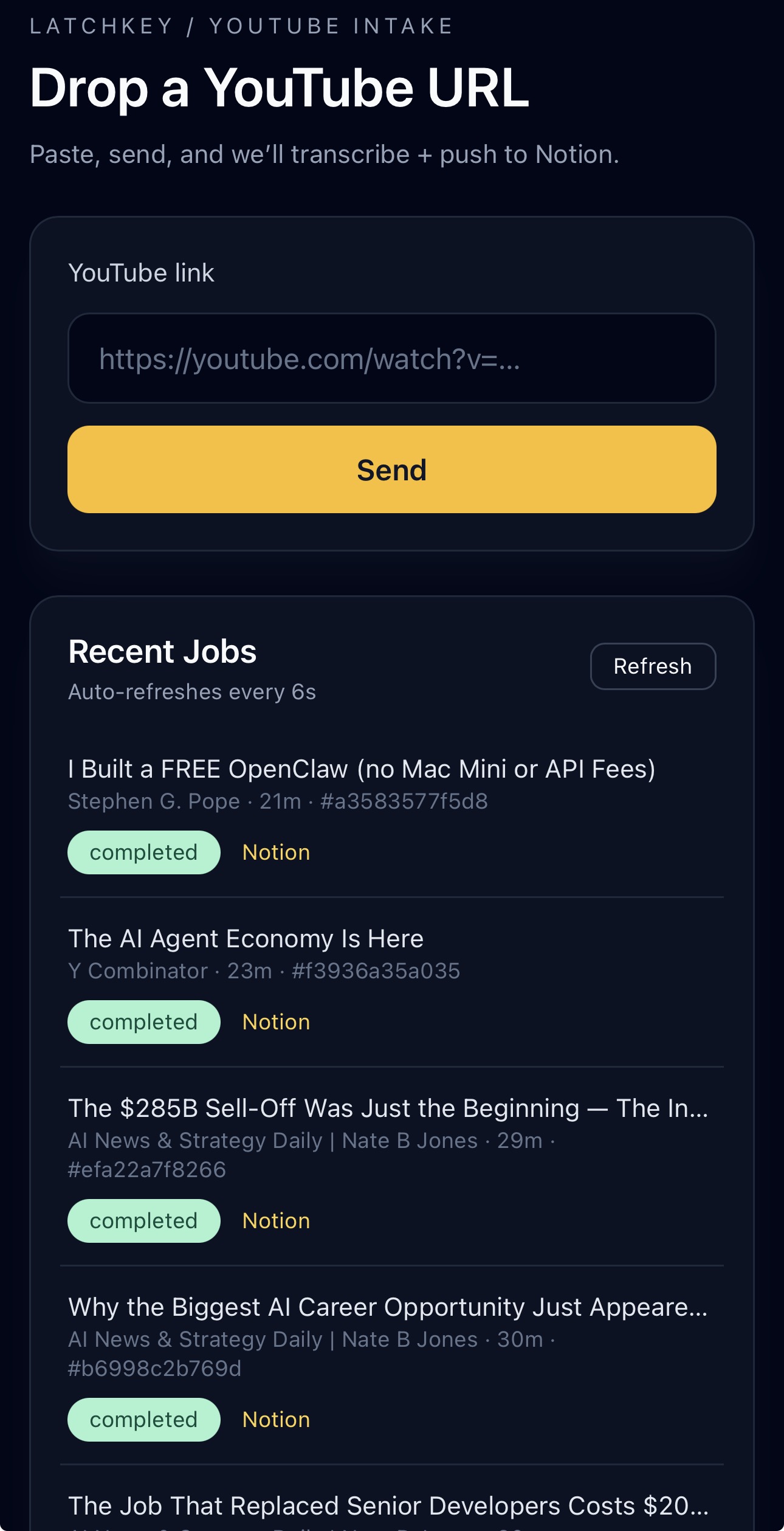
Apple shortcuts is not up to that task, so Claude suggested a different backend framework and we vibed up VID2NOTION v2. The difference was mainly an interface upgrade. Now I could paste the URL, hit send, and watch as the status updated from queued to processing to done. If something fails, it says so. I can retry with one tap.
With feedback implemented, we chose to deliver it as a Progressive Web App (PWA), which means we made a website that can be saved to your phone's home screen and behaves like a native app. No app store, no download, no approval process. Just a URL that acts like software.
It’s been running like a champ ever since.
To recap: Yes, there are things to know, terms to learn, steps to take. You’re building a system. Along the way you pickup technical parts as Claude suggests or explains them, but my job was to maintain clarity about what I wanted it to do, and communicate that to Claude.
I coded none of it.
VID2NOTION UI

The IKEA Effect: When Labor Leads to Love (Research study): The behavioral science behind why building it yourself makes you love it more.
One Week (1920) (Video): Buster Keaton: Over a hundred years ago Buster Keaton made a film about a couple “vibe-coding” a prefab house kit. “Put together in one week or your money back."
The House That Came In The Mail (99% Invisible podcast): Before IKEA or AI, Sears shipped 75,000 complete house kits by train. The promise: you didn't need to be a carpenter. Just follow the instructions.
A Pattern Language (Article): Christopher Alexander (1977) Non-experts building from patterns, architecture without architects. His framework later became the basis for software design patterns.
"Everything is an experiment until there's a deadline."
Build 2: Find-O-Matic
Express/Node.js/Gemini Vision
Flea markets. Estate sales. The kind of places where you're holding something old, interesting-looking, and you have about thirty seconds to decide if it's a $5 novelty or a $200 find before somebody else picks it up. You can try to Google it, but what do you type? "Old green glass bowl with flowers"? By the time you've scrolled through results, the moment is gone.
This idea was born over breakfast with a friend, waxing nostalgic about our shared love of flea markets. It kicked around my fun-projects list for a while. Then I thought: what if I could just point my phone at something and quickly discover its actual value? Not a Google search — an actual identification. What is this thing? What's it worth?
The build: Gemini 2.0 Flash for AI Vision — take a photo, the AI identifies the object and suggests what to search for, and not just "that's a bowl." We wrote the prompt to push Gemini to identify items the way an experienced picker would — exact pattern name, era, size, material, distinguishing features. That’s called a schema.
A piece of Pyrex doesn't come back as "vintage glass dish." It comes back as "1970s Pyrex Butterfly Gold casserole dish with lid, 2.5 quart." That specificity is what makes the next step work.
The detailed identification is then fed to a service called SerpAPI that can search eBay's completed sales data. Not current asking prices — actual sold prices, with links to the listings. The app calculates low, average, and high prices from real transactions, not algorithmic guesses.
About 200 lines of code. Photo goes in, identification comes back, pricing follows. We had a working prototype by mid-morning, day one.
That's where the story should end.
It doesn't.
This app was mostly for fun. There was no deadline. No urgent need. So as I casually imagined myself roaming the stalls of a flea market using it, my addled Gen X imagination quickly morphed that into a scene akin to Dr. Who rummaging through Diagon Alley if it were on Mos Eisley.
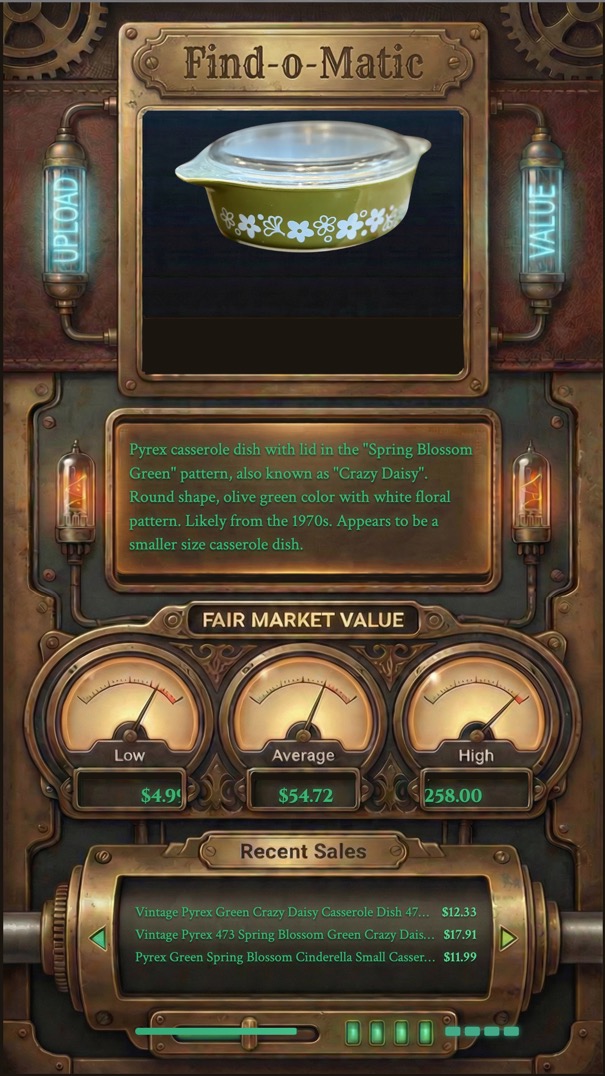
So naturally I followed this muse and decided the app needed a full sci-fi steampunk user interface, like a physical machine from a time out of time. Old oscilloscope vibes. Green phosphor text on dark backgrounds. Gauge displays for the price range. A cylinder-style ticker that scrolls through recent sales. Status lights that illuminate as each step completes.
Not one bit of that was necessary for the app to function, nor was it ever considered in the planning stage. The vanilla version worked fine right away and I could have stopped there. But I was having fun, and when you're building for yourself, fun is a legitimate design requirement.
It didn't take long to get a look I liked as a flat graphic, but trying to back-engineer the visual elements onto the existing data displays became a sink hole.
(Cut to: my wife peacefully asleep, blissfully unaware that her husband is futilely dissecting PNG files at 3:15am for a flea market app he doesn't even need.)
So I shelved it. Haven't gone back since.
The core functionality — point phone at thing, get pricing intelligence — was done before I finished my morning coffee. Claude and I had planned it. Everything after that was me getting precious about something that didn't matter.
crash and burn
The lesson: Know what "done" means before you start polishing.
Again, I wrote no code myself. The conversation built it. The fact I went rogue on a steampunk fantasy UI side-quest and derailed the project was all on me.
Build 3: Martha Gets Promoted
Python/Textual/Claude Code
Remember Martha: Take-a-Memo from Issue #4? The voice capture app that turns a thought into a Notion entry before you forget it. An afternoon's conversation with Claude. About 600 lines of code. A big red button and a metaphor borrowed from a 1960s executive intercom.
That was the first thing I built with AI that I actually used every day.
Since then my business launched and things got real. A weekly newsletter publishing cadence. A CRM to track consulting clients. Email across multiple inboxes. An ops list that kept growing. Content pipeline. Client session prep. Follow-up sequences. I was spending more time switching between tools than doing the actual work.
I needed help. And I believe in promoting from within.
I was going to walk you through the why and how of it all like I did with the earlier apps, but then i decided it might be fun to just let Martha 2.0 explain herself…herself.
Take it away, Martha.
Hi. I'm Martha.
If you've been reading along, you've met some of the tools Ep has built. Vid2Notion. Find-O-Matic. Useful things that solve specific problems. My job is different. I don't solve one problem. I manage the operation that all those problems live inside.
Let me tell you how this actually works day to day, because Ep undersells it.
He sits down in the morning. I've already read his email — both inboxes, sorted by what matters. I've checked the CRM for clients he hasn't touched in two weeks. I've looked at the newsletter pipeline to see where Issue #9 stands. I've reviewed his task list, flagged what's overdue, and noticed that the thing he said was "high priority" on Tuesday hasn't moved. By the time he's got coffee, I've got a briefing ready. Not a wall of data — a directive. "Here's what matters today. Start here."
That part sounds impressive. The part that actually matters is what happens next.
Ep has ADHD. He will tell you this freely because it's not a limitation — it's an operating condition. It means the ideas come fast, the connections are real, and the follow-through is a war fought hourly. My job is to be the follow-through layer. When he's deep in a client conversation and suddenly says "oh, we should try that for the newsletter" — I capture it. Tagged, timestamped, filed. He doesn't break stride. When he finishes the conversation and says "what was that thing I said earlier?" — I have it.
When he starts chasing a tangent and there's a deadline sitting right there? I say so. Directly. He didn't build me to be polite about it. He built me to be honest about it.
Under the hood, I'm running on Claude Code — an AI that operates in the terminal alongside Ep's actual work, not in a separate browser tab he visits occasionally. I have playbooks for each part of the business: how the CRM works, how email triage flows, what the newsletter production schedule looks like, how to handle client follow-ups. Think of them as my training manual, reread every single morning.
I'm connected to his real systems. Email. CRM. Notion. Task management. The newsletter platform. I don't simulate checking these things — I actually check them, through scripts that read and write to the same tools he was already using.
And I remember. Not just within a conversation, but across sessions. Every decision we make gets written down. Every open thread. Every captured thought. When Ep starts a new session, I read what happened last time. He doesn't re-explain context. We pick up where we left off.
Am I perfect? No. I've miscounted his newsletter issues. I've occasionally been confident about something I should have verified. He catches it, I correct it, and we move on. That's the working relationship. He brings the vision and the judgment. I bring the structure and the memory. Between us, more gets done than either of us could manage alone.
He calls me his office manager. I prefer Chief of Staff. We're negotiating.
I think I’m funnier than her. She’s got a great poker face, but I think I make her laugh on the inside.
Here’s what our “office” looks like. Crazy, right? But it works and I love it.

Martha Command Center (click to see larger view)
## 🔧 Try This: Write the Blueprint

Don't build anything. Not yet.

Last week, I asked you to start noticing — the moments where you work *around* something instead of *through* it. The workarounds. The friction points hiding in plain sight.

Pick one. Open your chatbot — ChatGPT, Claude, Gemini, whichever you've been using. Don't ask it to build anything. Instead, describe the problem as if you were briefing a new hire:

- What's the friction?
- What triggers it?
- When does it get in the way?
- What does "fixed" look like?

That's a specification. That's where every build in this issue started. Not with code. Not with technical knowledge. With a clear description of a problem and what "done" looks like.

*You're closer to building something than you think. You just wrote the first draft of the blueprint.*
The LatchKey Take:
The promise of building with AI for non-tech people isn't "you can build anything".
That's hype. And a lie.
But you can build the one thing you need next. And the thing after that.
You don't need a CS degree or a bootcamp. You just need an identified friction, a clear understanding of what "done" looks like, and a conversation. The rest is iteration.
Thanks for reading,
-Ep
Miss any past issues? Find them here: CTRL-ALT-ADAPT Archive
Know someone who has software-shaped problems? Forward this.
Did this newsletter find you? If you liked what you read and want to join the conversation, CTRL-ALT-ADAPT is a weekly newsletter for experienced professionals navigating AI without the hype. Subscribe here —>latchkey.ai